

Skip to content

Liquidation lot
analyzer

LotGeek reads the lot manifest, finds comparable eBay sold listings and estimates resale prices automatically. Review costs and profit before bidding on BStock, Direct Liquidation or TechLiquidators.

Free monthly UsageNo card needed

Works directly on supported lot pages.
Item prices, purchase costs and profit in one report.

LotGeek on BStock: lot analysis, resale prices and profit by bid. Expand the video to see the details.
  • BStock
  • Direct Liquidation
  • TechLiquidators

LotGeek features

Liquidation manifest analysis with eBay sold prices

Analyze lots on BStock, Direct Liquidation and TechLiquidators. LotGeek estimates resale prices from comparable eBay sold listings and calculates lot value, purchase costs and estimated profit.

Lot profitability report

Analyze liquidation lots from the marketplace page

After installation, LotGeek adds an Analyse lot button to each supported lot page on BStock, Direct Liquidation and TechLiquidators. Click it to generate a report with item resale estimates, purchase costs and estimated profit.
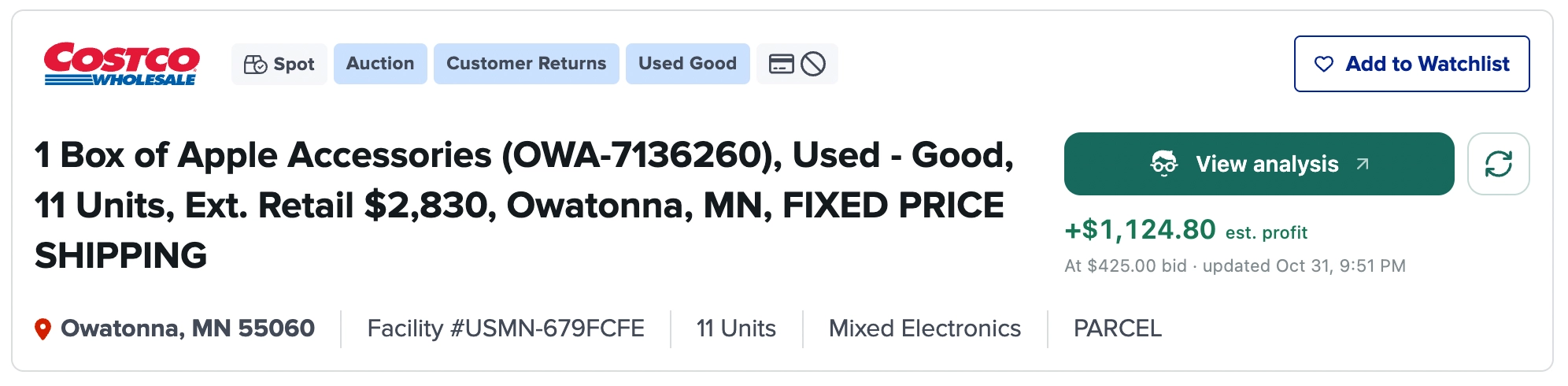
BStock lot page with LotGeek’s analysis button and estimated profit after a completed lot analysis
Shown after analysis: the button reads View analysis, with estimated profit and the current bid below it.View full size

eBay sold-price estimates

Item resale prices and total lot market value

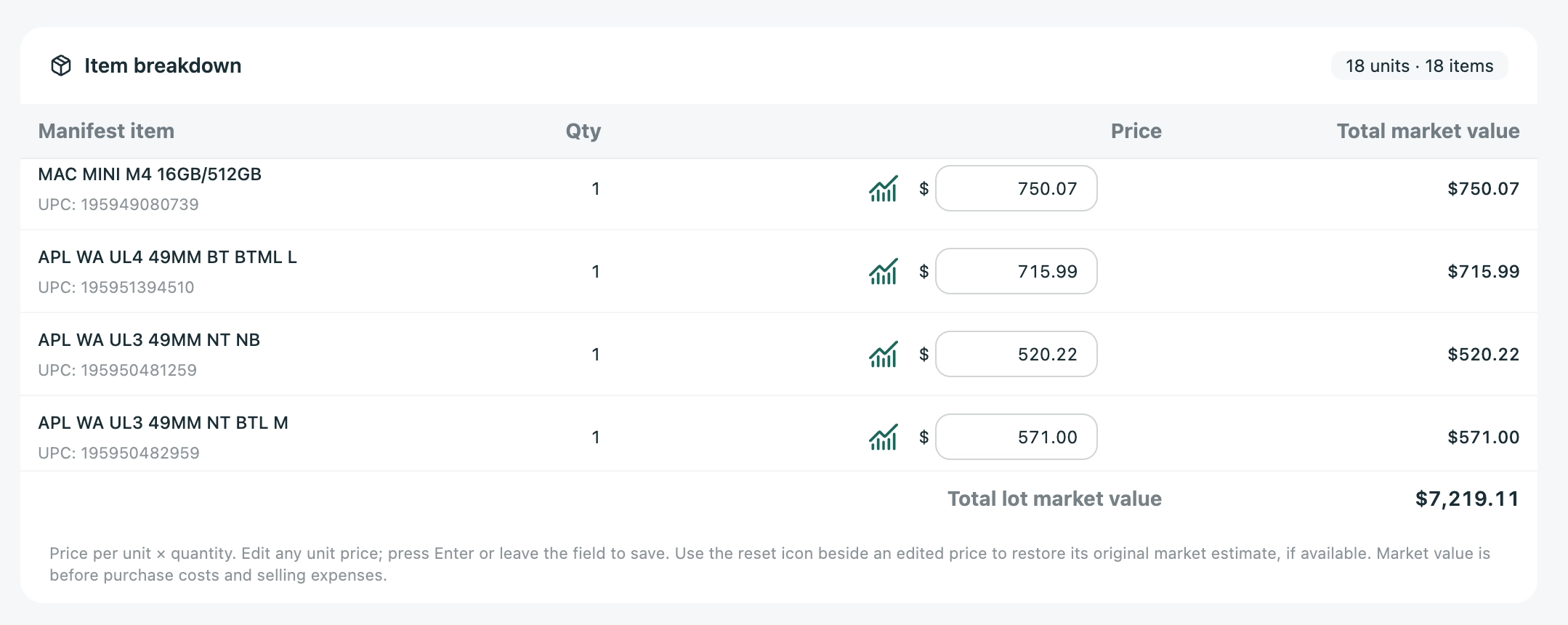
The item breakdown shows manifest descriptions, UPCs, quantities and estimated unit prices. Edit any price, enter a missing price or restore the original estimate. Lot market value updates with your changes.

LotGeek manifest item breakdown showing editable unit prices, quantities, UPCs and total estimated resale value
Estimated unit price × quantity. Item totals are added to calculate the lot’s market value.View full size

Choose the eBay conditions before analysis: New, Open box, refurbished, Used or For parts. For mixed-grade manifests, adjust Grade C prices with a condition discount.

Liquidation lot profit calculator

Calculate landed cost, profit and break-even bid

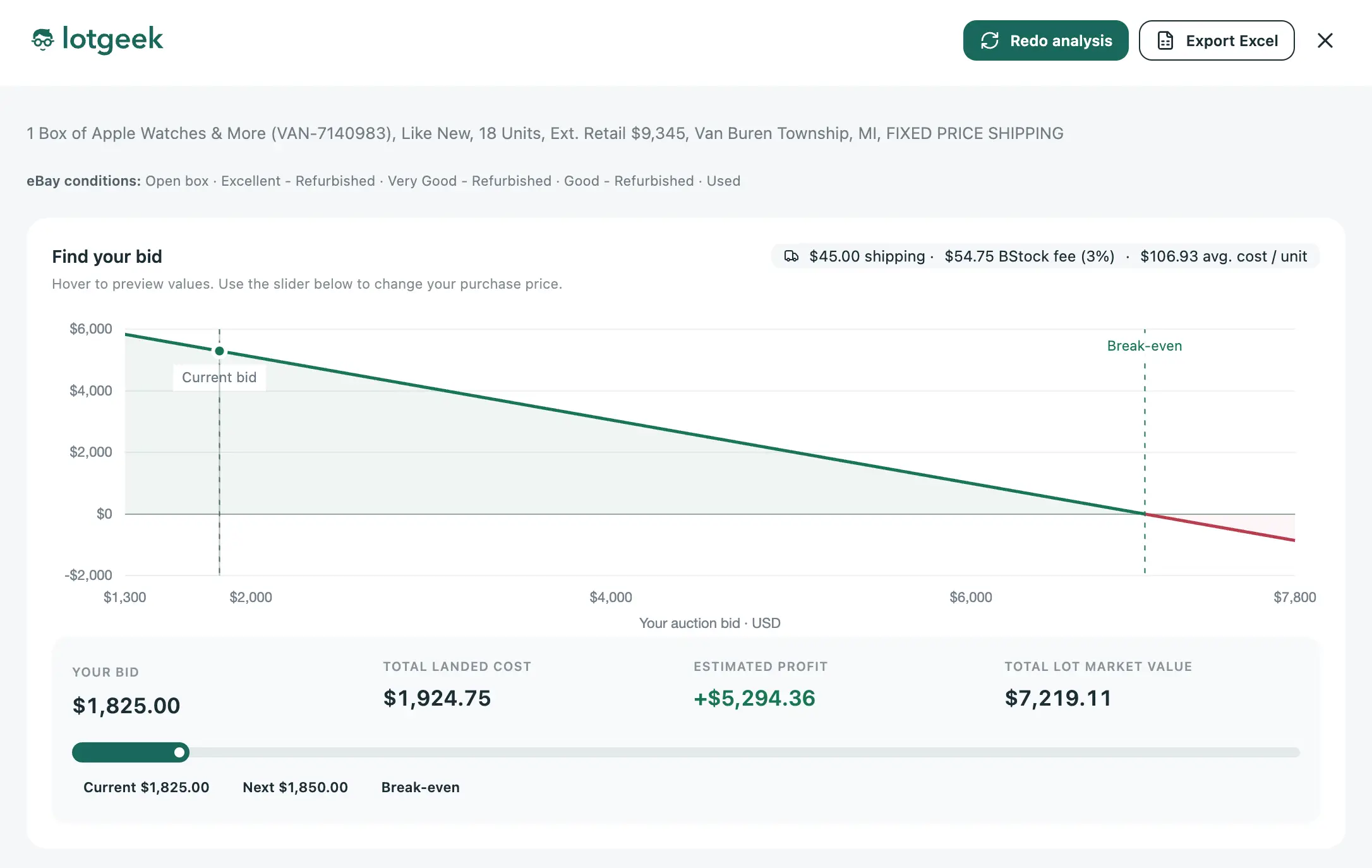
Total landed cost includes your bid, inbound shipping and buyer fees. Move the bid slider to recalculate estimated profit. Hover over the graph to preview a bid without changing the selected value.

LotGeek liquidation lot profit calculator with a bid slider, current bid, break-even point and total lot market value
The graph shows estimated profit at different bids and marks the break-even price.View full size

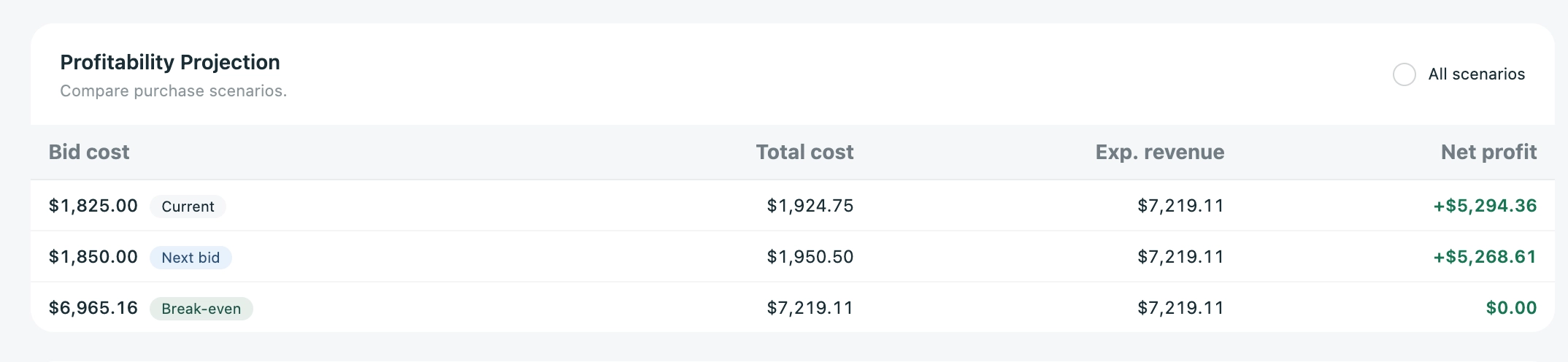
Compare the current bid, next minimum bid and break-even price

LotGeek profitability projection table comparing current bid, next minimum bid and break-even bid with landed cost and estimated profit
Purchase costs and estimated profit for each bid scenario.View full size

Analysis in auction listings

See saved lot analyses and profit estimates in the auction catalogue

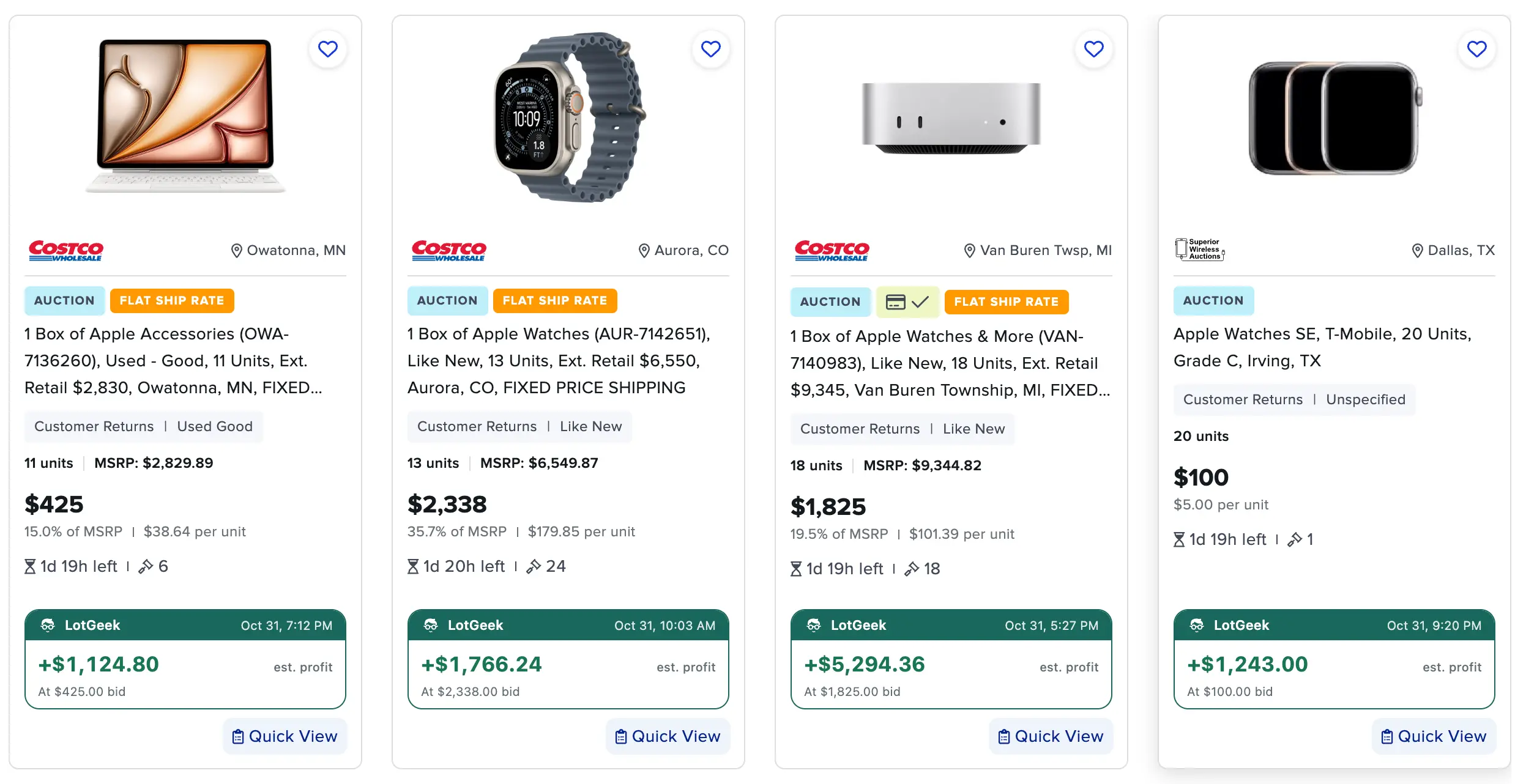
For lots you have already analyzed, LotGeek displays the report date and estimated profit or loss at the current bid or asking price. Catalogue widgets are available on BStock, Direct Liquidation and TechLiquidators.

BStock auction listings with LotGeek analysis widgets showing saved report dates and estimated profit at current lot prices
BStock catalogue: saved analyses and profit estimates appear directly on the lot cards.View full size

Export lot analysis to Excel

Download item prices, purchase costs and profit calculations. Workbook formulas update totals when inputs change.

Resume an interrupted analysis

Continue with the saved conditions and completed items. After 24 hours, start a fresh analysis.

Save and reopen reports

Reports stay in your browser. Set their retention period from 1 to 99 days in settings.

LotGeek pricing

Free and Pro plans for liquidation lot analysis

Both plans include resale price estimates, manual price editing, profit calculations, saved reports and Excel export.

Free Plan

For lots with a maximum of 25 unique products.

$0/ month

No payment card needed.

Contact Us
  • Maximum 25 unique products per lot
  • Supported marketplace integrations
  • Market prices and manual adjustments
  • Interactive profit projections
  • Saved reports and Excel export

Pro Plan

More monthly Usage, with no per-lot product count limit.

$29/ month

Manage or cancel any time.

Contact Us
  • Everything else included in Free
  • Unlimited unique products per lot

Prices in USD. Choose and manage your plan inside LotGeek.

Using LotGeek

Questions about LotGeek

Questions about a lot analysis or your account?
Get in touch

Which marketplaces does LotGeek support?

LotGeek supports BStock, Direct Liquidation and TechLiquidators. You can analyze supported lots with manifests, including boxes, pallets and truckloads, directly from their marketplace pages.

Do I have to look up every item’s price myself?

No. Start an analysis from the lot page and LotGeek reads the manifest, searches comparable eBay sold listings and estimates item prices automatically. Keep the tab open while it works. You can review every estimate; if no comparable price is found, enter that price manually.

Can I adjust resale prices for different conditions and grades?

Yes. Edit any unit price, restore an original market estimate, and adjust Grade C items using a condition discount. Lot value and profit projections update as you change your assumptions. Missing shipping and buyer fees can also be entered in the analysis.

Can I export my analysis to Excel?

Yes. Use Export Excel in the analysis window to download a formatted report with the item breakdown, resale prices, purchase costs and profit calculations. The workbook includes formulas so totals update when you change its inputs.

What happens if an analysis is interrupted?

LotGeek saves progress so you can resume an unfinished analysis. After 24 hours it starts a fresh analysis because market prices may have changed. Saved report retention defaults to 30 days and can be set from 1 to 99 days.

What is the difference between Free and Pro?

Free supports lots with up to 25 unique products. Pro includes more monthly Usage and has no per-lot product count limit. Both plans include the same analysis tools and Excel export. Your account shows remaining Usage and the next refresh date.

Can I cancel Pro from the extension?

Yes. Open your account in the extension to manage billing or cancel through Stripe’s secure portal. Pro costs $29 per month; after cancellation, access continues until the end of your paid billing period.

Estimate a liquidation lot before you bid

Compare resale value, purchase costs and estimated profit on supported marketplaces.

Contact Us